Most small business owners are doing work their computers could handle. Not because automation is hard to understand, but because nobody has stopped to point out which tasks are the easiest to hand off. Here are five that almost every business can automate, regardless of industry or technical background, along with what the setup actually involves and what you should expect to get back.

Email Triage and Auto-Replies
The average professional spends over two hours per day managing email. A significant portion of that time goes to categorizing messages and sending responses that are essentially identical every time. An automated system reads incoming emails, sorts them by intent, and sends a tailored reply within seconds. Messages that genuinely need a human still get one. The rest are handled before you have finished your first coffee.
The setup involves defining the categories that matter for your business, writing the response templates once, and connecting the system to your email account. For most businesses, the categories are straightforward: new inquiry, existing client question, press or collaboration request, spam. The logic does not need to be complex to be effective.
The Konkan Sun Productions inbox handles two active brands simultaneously. Every incoming email is categorized by intent automatically. Warm leads are flagged for personal follow-up. Cold emails receive an auto-reply and are logged. If no human response goes out within three days, a follow-up fires automatically. Inbox triage time dropped from 45 to 60 minutes per day to under five minutes of reviewing flagged leads only. In the two inboxes I have measured, this single workflow returned four to six hours a week.
Client Follow-Ups After a Job
Repeat business is lost more often to silence than to bad service. A client who had a good experience and never heard from you again has no particular reason to come back. Automated follow-up sequences fix this without requiring any ongoing attention from you.
A well-designed follow-up sequence has three beats. A thank-you goes out the day the job is marked complete. A review request follows three days later, timed to land when the experience is still fresh but the client has had a chance to use the work. A re-engagement message goes out after thirty days of inactivity, asking whether there is anything else on their list. No promotion, no discount, just a reminder that you exist and are available.
The timing matters as much as the content. Most businesses follow up when someone remembers to, which is inconsistently and often too late. Automation makes consistency reliable, which is what clients actually experience as good service. How much time this returns depends on how many jobs you close. What does not vary is that every client gets the same sequence on the same schedule.
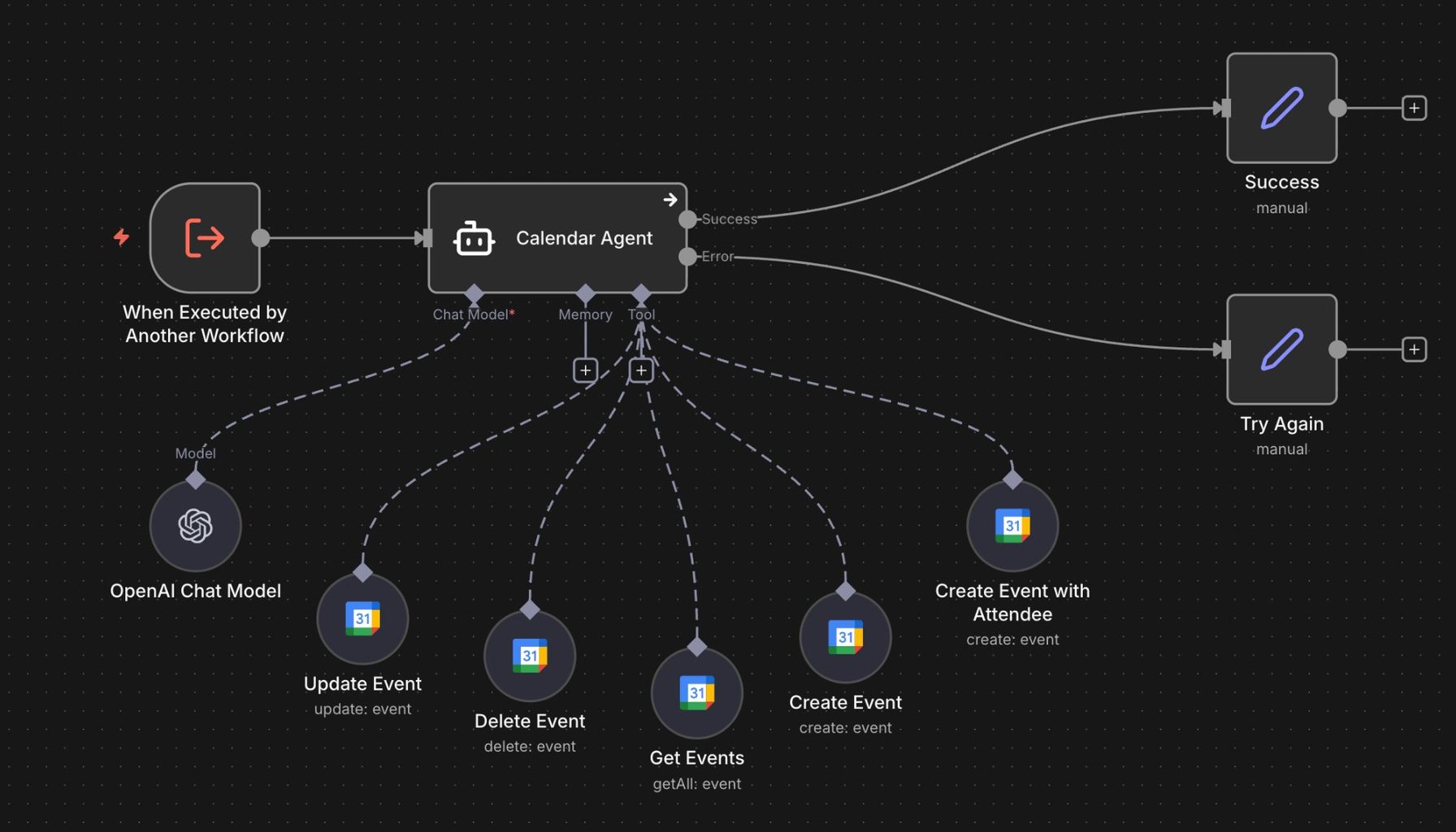
Appointment Reminders and Booking Confirmations
No-shows cost service businesses real money. Automated confirmation and reminder messages, sent 24 hours and two hours before an appointment, reduce no-shows by around 38 percent in the healthcare trials that have measured it. For a business with 20 appointments per week at an average job value of $200, recovering even two additional appointments per week adds up to over $20,000 in recovered revenue per year.
The setup is straightforward: connect your booking system to an automation platform, define the reminder timing, and write the message templates. Most booking systems have native integrations with automation tools. For systems that do not, a simple webhook connection handles it.
Beyond reminders, booking confirmations sent immediately after a client schedules reduce the anxiety that leads to last-minute cancellations. A confirmation that includes everything the client needs, location, what to bring, how to prepare, and a contact number for questions, sets the stage for the appointment before it happens.
Invoice Generation and Payment Follow-Up
Sending invoices manually, tracking which ones have been paid, and chasing overdue payments is time-consuming and easy to let slip during a busy period. An automated workflow generates and sends the invoice the moment a job is marked complete, logs the payment when it arrives, and sends reminder messages on a schedule when it does not.
A typical automated billing sequence looks like this: invoice generated and sent on job completion, a payment confirmation sent when the payment lands, a gentle reminder at day ten if the invoice is still open, a firmer follow-up at day twenty, and an escalation flag at day thirty. All of this runs without manual intervention. You see the payment when it arrives and the exception flag when something needs attention.
On the one home services business where I have measured this, average collection time improved by twelve days. For a business with a monthly receivables balance of $30,000, pulling collection forward by two weeks is worth real money in cash flow terms, before you account for the time saved chasing payments.
Data Entry and Database Updates
Any task that involves copying information from one place and entering it into another is a candidate for automation. New client records, product details, performance data, inventory counts, review scores: all of these can be captured and logged automatically as they come in, rather than batched and entered manually at the end of the week.
Manual entry with no verification step runs around four percent per field. Add double-keying or a verification pass and it drops toward one percent or below. In a database with 500 records and 10 fields each, that is somewhere between 50 and 200 errors. Those errors compound: a wrong email address means a missed follow-up. A wrong invoice amount triggers a dispute. A duplicate record means two people contacting the same lead with different messages. Automated pipelines that validate data on entry bring the error rate to near zero.
The fragrance database at The Society of Scents and Spirits tracks over 750 bottles, each with notes, reviews, acquisition data, and sourcing information. Before automation, keeping it current was taking three hours per week and still falling behind. After building an ingestion pipeline, it updates automatically as new items are added. The three hours dropped to zero, and the database became reliable enough to feed a content suggestion system that now generates post ideas automatically every week.
None of these automations require a developer or a technical background to request. They require someone to describe what is happening manually today and someone else to build the system that replaces it. If any of these sound like your week, let's talk.
Building Each Automation Correctly
Each of the five tasks above can be built at different levels of sophistication. The right level depends on your volume, your existing tools, and how much variation exists in the process. Here is how to think about the build for each one.
For email triage, start by mapping the categories manually before you build anything. Spend one week tagging every incoming email by intent. What are the actual categories? How many emails fall into each one? What does the ideal response look like for each? That mapping exercise produces the data you need to build an accurate classifier and write templates that cover the real cases rather than hypothetical ones.
For client follow-ups, the most important decision is the trigger. What constitutes "job complete" in your current system? If you have a booking or job management tool, the trigger is a status change in that system. If you are working from email or a manual process, the trigger might be a tagged email or a checkbox in a spreadsheet. Define the trigger precisely before building the sequence, because everything else depends on it firing correctly.
For invoicing, the key decision is whether to generate the invoice automatically or to auto-populate a draft that a human reviews before sending. For recurring work with predictable amounts, full automation makes sense. For project work where the invoice amount varies, a human review step before sending protects against billing errors. Build the automation that fits your actual billing pattern, not the one that sounds most impressive.
For data entry, the most valuable step is validation. Before the data writes to the destination, define what a valid record looks like: required fields, acceptable formats, value ranges, deduplication checks. Invalid records should route to a review queue rather than writing with errors. That single design decision is what produces near-zero error rates and what makes the database reliable enough to trust downstream.
Start by picking one task from the list above, documenting exactly how it works today, and building a system that handles it reliably. Run it for a month, measure what changes, and then decide what comes next. The compounding effect of one well-built automation creating the conditions for the next is real. The businesses that are systematically more efficient made one good decision at a time, consistently, over months and years.
Each of these five automations compounds over time. The client follow-up system that runs for a year will have followed up with hundreds of clients who might otherwise have heard nothing. The invoice automation that runs for a year will have collected payment consistently, without gaps, without delays caused by a busy week. The data pipeline that runs for a year will have maintained a database that is reliable enough to build on. The value sits in the consistent execution week after week, which a manual process cannot match.
See this in practice: Content Creators use case →
Sources
- Appointment reminders reducing missed appointments by around 38 percent: the evidence base is clinical. A randomized controlled trial in BMC Ophthalmology found SMS reminders cut no-shows by 38 percent against a no-reminder control, and a systematic review found a weighted mean relative reduction in non-attendance of 34 percent. No comparable study exists for service businesses, which is why the sentence says where the number comes from.
- An earlier version of this post claimed automated reminders reduce no-shows by 30 to 50 percent on average. The top of that range traces to vendor marketing rather than to research, and the claim was not scoped to any population.
- The twelve-day improvement in average collection time is measured on one home services client. It is a single business, not an average.
- An earlier version claimed automated invoice workflows collect payment an average of 15 days faster. Every figure supporting that traces to a vendor selling invoicing software, and those figures contradict each other. It has been replaced with our own measurement.
- An earlier version also claimed businesses following up within 24 hours are 60 percent more likely to receive a review. That number could not be traced to a primary source and has been removed.
- The email triage figures come from two client inboxes we have measured, including Konkan Sun Productions. An earlier version generalized them to most businesses.
- Data entry error rates: single-keyed entry without verification is widely reported at around four percent per field, against 99.96 percent or better accuracy for double-keyed entry. The most-cited benchmark for skilled operators working under verification is 0.5 to 1 percent, drawn from human-factors research of the 1980s and 1990s. The peer-reviewed work most often cited behind these figures is Barchard and Pace, Computers in Human Behavior, 2011, which compared single entry, double entry and visual checking and found double entry produced far fewer errors than visual checking. An earlier version of this post gave one to four percent as an average, which it is not. It is a range whose position depends on whether anyone verifies the entry, and that distinction is the reason automation helps.
- The $200 average job value, the 20 appointments per week, and the $30,000 receivables balance are illustrative figures chosen to make the arithmetic legible.
A note on images across this site. Illustrations and workflow diagrams are made with AI, from prompts we write and refine, and we edit most of them afterwards. Screenshots taken in n8n are not, since they show workflows we built in the tool.
Subscribe if you like practical lists like this, one useful briefing a week on AI and automation.