Most businesses try to automate too many things at once. Nothing gets finished. Nothing works well. Start with one workflow. Build it right. Then move on.

Why Is Onboarding the Right First Workflow?
Because it fires every single time revenue comes in. Every new client, every new customer, every signed contract. No other workflow in your business touches that moment more consistently.
That's also when expectations are set. A client who hears from you within minutes of signing feels like they made the right call. One who waits two days for a confirmation starts to wonder. That first impression is hard to undo, and right now you're probably leaving it to chance.
The moment someone says yes, a confirmation goes out, a contract gets sent, a kickoff gets scheduled, and someone on your team gets notified. Most businesses do all of that manually. Differently each time, depending on who's handling it and what else is going on.
Some clients get a fast, polished response. Others wait. That inconsistency is invisible to you and very visible to them. Fixing it here, before you touch anything else, gives every other part of your business a stronger foundation to build on.
The Tiered Approach
An onboarding workflow fixes that inconsistency. And it does more than just create consistency. Tiered workflows mean your most important clients can automatically get a different, more tailored experience. A high-value contract triggers a senior team member notification, a personalized welcome, and a faster kickoff window. A standard engagement follows the default path. Same system, customized by deal size or client type. All of it automated.
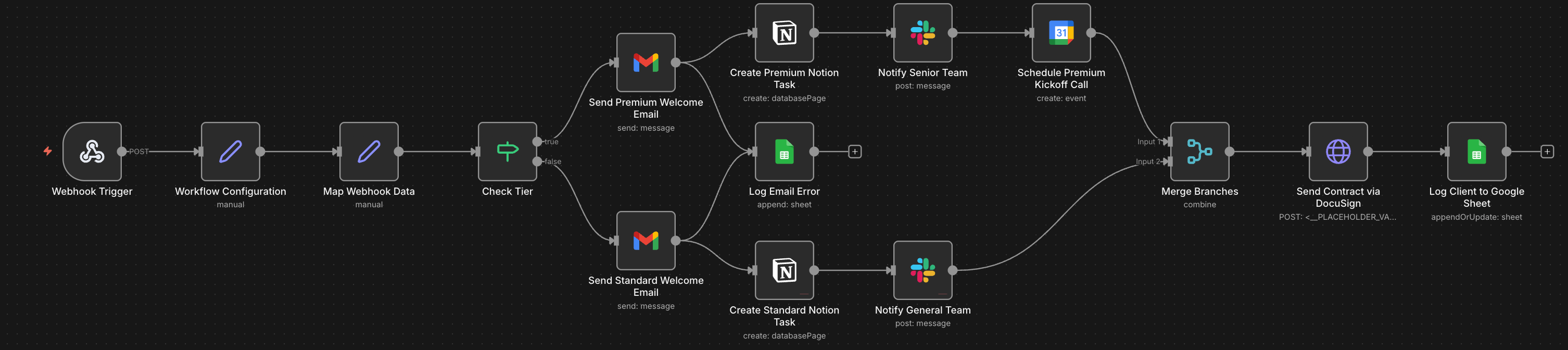
How It Works
Building this isn't necessarily complicated. A trigger fires when a deal is marked won or a form is submitted. From there, the actions kick off: documents go out, calendar links get sent, your team gets a Slack message. The whole thing is customized to your tiers and runs without anyone touching it.
Why It Compounds
This is where client confidence gets set or lost. It's also where most small businesses quietly lose points they worked hard to earn. Fix this first and everything downstream gets easier.
Once it's running, you'll start looking at the rest of your operation differently. Every repeated, manual, inconsistent thing starts to look fixable. That's when automation starts to compound.
See this in practice: Service Businesses use case →
Sources
- The recommended first workflow, its trigger and action structure, and the failure modes described come from automations built for Agent Micho clients and for our own operations.
- n8n and Slack are named as the tooling. Both change between releases.
- The judgment about which workflow to build first is ours. It reflects what tends to pay back fastest in the businesses we have worked with, not a benchmarked result.
A note on images across this site. Illustrations and workflow diagrams are made with AI, from prompts we write and refine, and we edit most of them afterwards. Screenshots taken in n8n are not, since they show workflows we built in the tool.