I work in perfumery, AI automation, and video production. People assume these are unrelated. After five years of running all three, I can tell you exactly where they overlap, and where the overlap stops being useful.
Here's the part that's real.
The Fragrance Parallel
In fragrance, a composition has a top, a heart, and a base. Each accord sets up what the next one has to do. If the top is too loud, the heart never gets heard. If the base is weak, the whole thing collapses after an hour.
I noticed I was building automation workflows the same way. The trigger sets up what the logic must do. If the trigger fires too often, you get duplicate runs and rate-limit failures before the logic ever gets a chance. If the output layer is weak, the workflow runs, but nobody trusts it.
The SSS Rebuild
When I built the fragrance database workflow for The Society of Scents and Spirits, my first attempt was a single, detailed prompt that asked the model to do everything at once. Parse the email, extract the data, enrich the notes, score the confidence, write to Notion. The prompt was thorough. The output wasn't. It kept breaking, and when it did, I couldn't tell which part had failed.
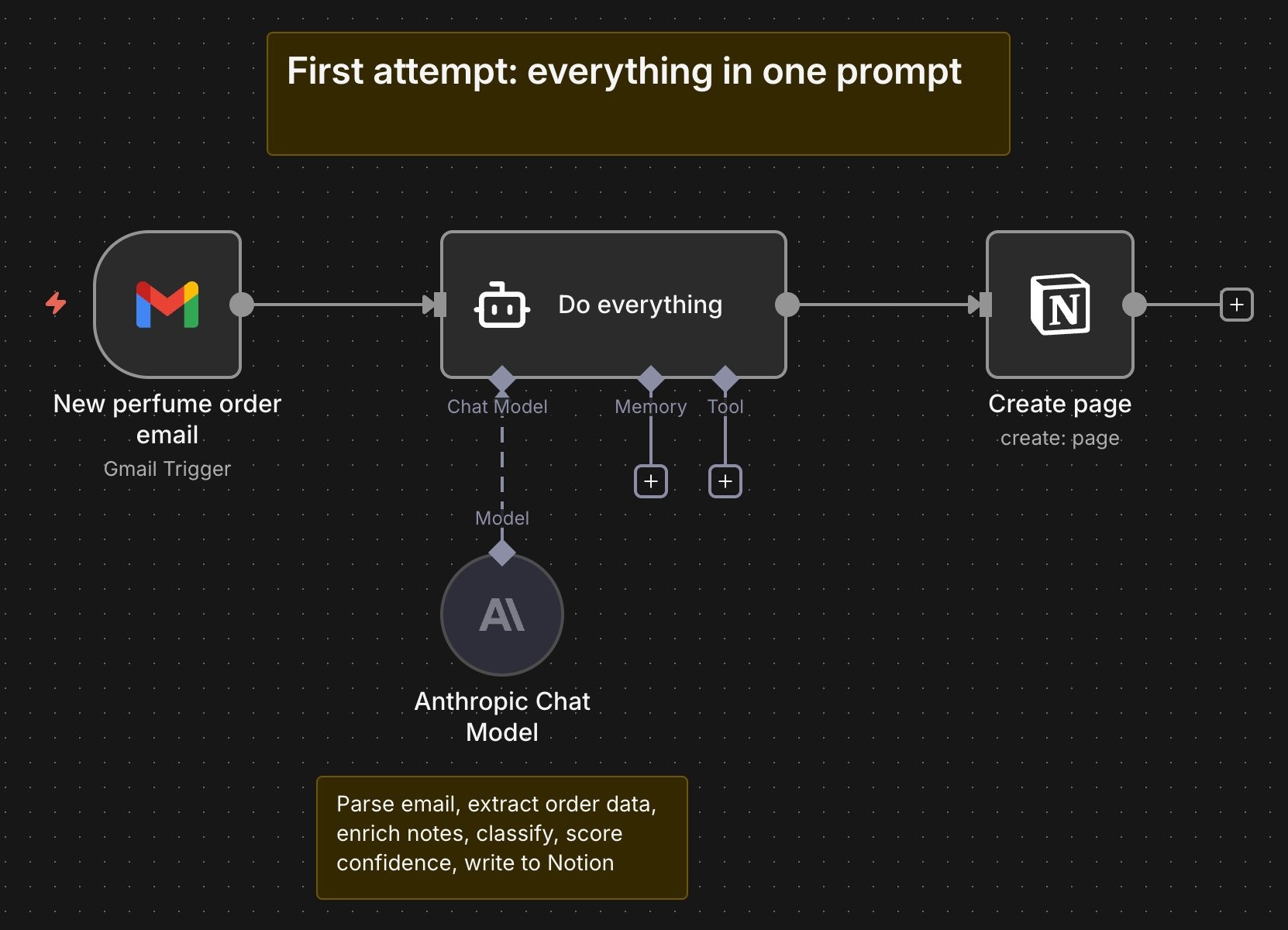
The software doesn't yet build itself the way a software engineer would. So, I rebuilt it that way. Three stages with clean handoffs between them, the way a perfumer builds a composition. Top stage captures. Heart stage enriches. Base stage validates. Each stage logs its own output. Each stage can be debugged on its own. When something does go wrong, the fix takes minutes, not hours.
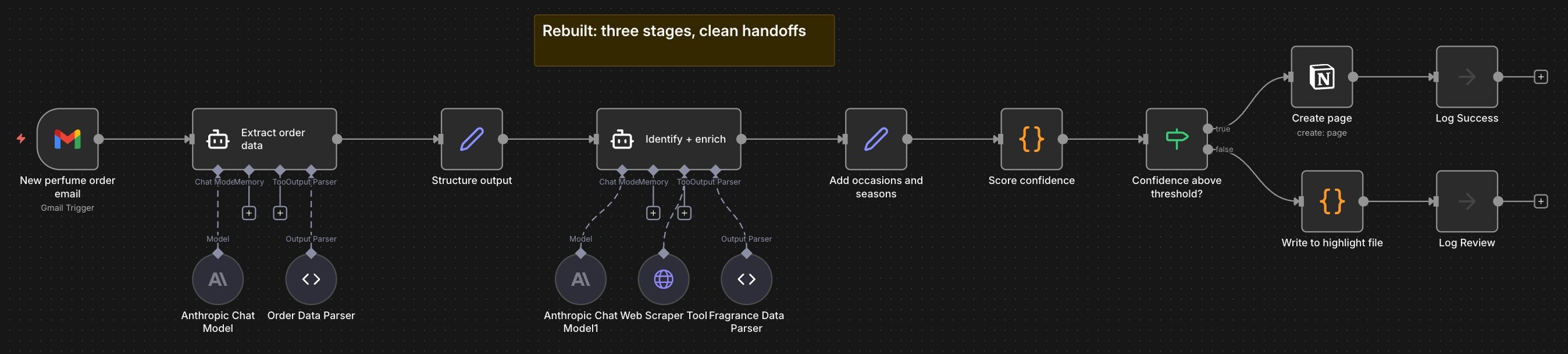
How the Three Stages Work
Each stage does one thing well, logs its own output, and hands off cleanly. Here's what happens inside.
Stage one captures. A Gmail trigger fires on every new email. An extraction agent parses the brand, fragrance name, concentration, size, price, and retailer. A parser validates the structure. A formatter shapes the data for handoff. Every email hitting the trigger gets logged, including ones that are not order confirmations. The raw email body gets logged before parsing so failures can be debugged later. Parse errors are written to a dedicated error file with the raw email attached. If this stage fails, you know it's a parsing problem, not a downstream issue. The process never moves forward with bad data.
Stage two enriches. The enrichment agent takes the structured order data and pulls fragrance metadata. It checks the brand's website first, falls back to Fragrantica if notes aren't available there, and if that fails, falls back further to a general web search. Nasomatto is a good example of why this matters. Their own site doesn't list notes. Fragrantica has them for some bottles in the collection but not others. The same brand can land at different points in the fallback chain depending on which fragrance comes in. Each bottle also gets classified by occasion and season. The workflow logs which source the data came from and flags fallback events when the primary source fails. Enrichment failures go to the error file with the structured order data intact, so the run can be retried later.
Stage three validates. A confidence score is applied to the enriched data. A gatekeeper checks the score against a threshold. High-confidence entries are written directly to the Notion database and logged as successes. Low-confidence entries are written to a highlight file and an error file for review, with links back to the raw email and the model's extracted fields, side by side. Every score gets logged, pass or fail. Average confidence is tracked over time so long-term drift is visible.
Each stage has its own error branch. Failures are contained, observable, and recoverable. The workflow doesn't break. A stage breaks, and you know exactly which one.
Right now, failures surface when checking the error file. A Slack integration and email notifications are in the works, so the workflow can flag issues in real time rather than waiting for support staff to look.
The Second Thing That Transfers
The structure is the first thing that transfers across my three fields. The engineering discipline is the second.
I have a Master's in Computer Science. The fundamentals were drilled in long before LLMs existed, like they do today. Separation of concerns. Error handling. Logging. Testing. Graceful degradation.
I build AI workflows the way I'd build any production system. I log every step. I handle failure modes before the happy path. I write for the version of me who has to debug this at 2 am six months from now.
Last month, I caught a silent failure in the fragrance database because a log line I'd added three months earlier flagged a confidence score quietly drifting downward. The model was still writing to Notion. The data was still landing. But the scoring was degrading, and without that log, I would have found out months later when the database was full of bad entries. That's the difference between a workflow that works and a workflow you can trust.
What This Looks Like for Client Work
One of the workflows I built applies a similar three-stage architecture to a legal database. The client is a small law firm tracking case precedents across hundreds of rulings. Every week, new rulings come in as PDFs from court filings, legal newsletters, and subscription services. The partners wanted them structured, tagged, and searchable without anyone having to read every ruling themselves.
The first version was built internally by one of the partners. It tried to do it all in one pass. Ingest the PDF, extract the case name and citation, summarize the ruling, tag it by legal area and jurisdiction, and write it to the database. It broke on anything non-standard. A ruling with an unusual citation format. A PDF with a scanned page. A newsletter with two rulings packed into one document. The model would either fail outright or, worse, succeed with the wrong data.
Agent Micho was brought in to fix it. We rebuilt it in three stages.
Stage one captures. OCR runs on scanned pages with a character-level confidence score. The PDF parser extracts raw text. A structure check verifies the document contains the fields you would expect of a ruling (case name, court, date, disposition) before anything moves forward. Documents that fail the structure check go to an error file with the raw PDF attached.
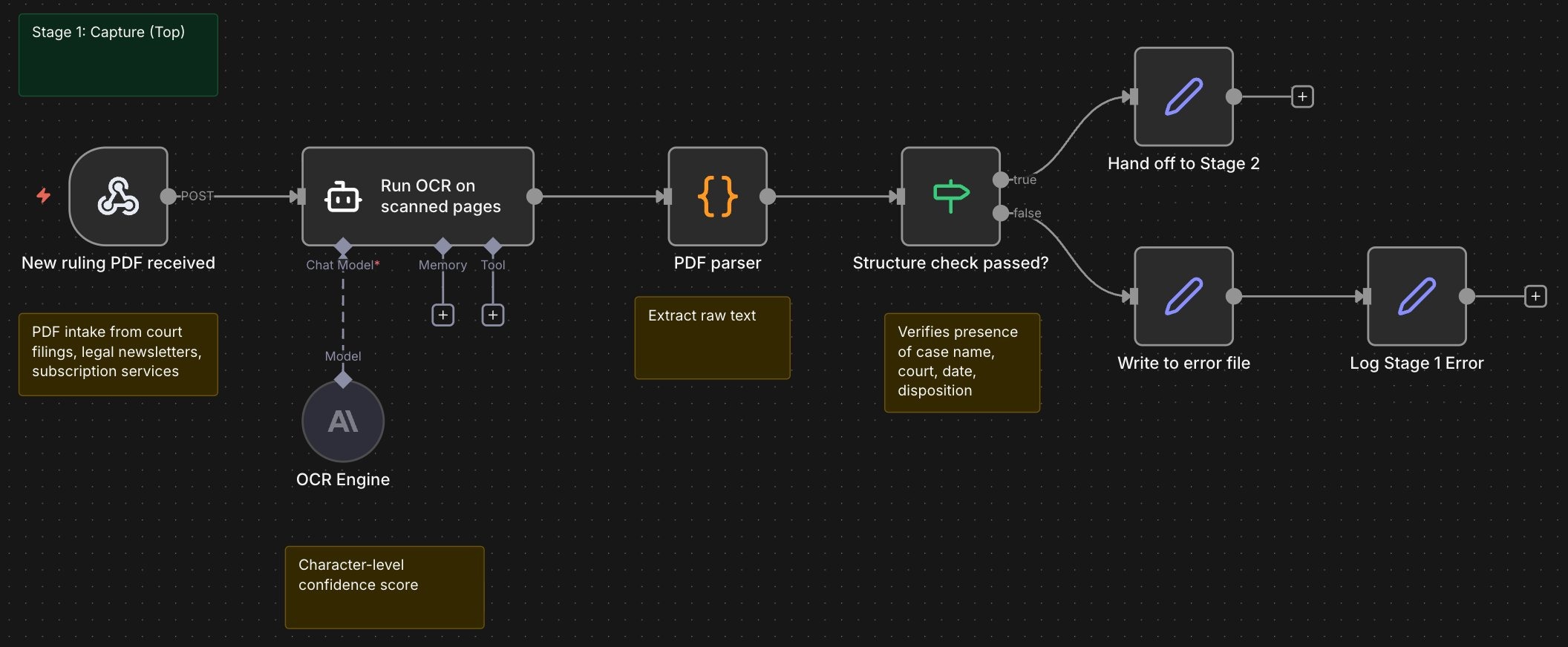
Stage two enriches. The model identifies the case, pulls the citation from an authoritative case database, summarizes the ruling, and tags it. Tags follow a recognized industry taxonomy and cover practice area (such as commercial litigation, employment, IP), jurisdiction, court level, judge, parties, ruling outcome, citation type, and precedent value. Firm-specific tags layer on top. Fallbacks exist for every source. If the citation can't be verified against the case database, the document is raised to a paralegal for review rather than written to the live database with an unverified reference.
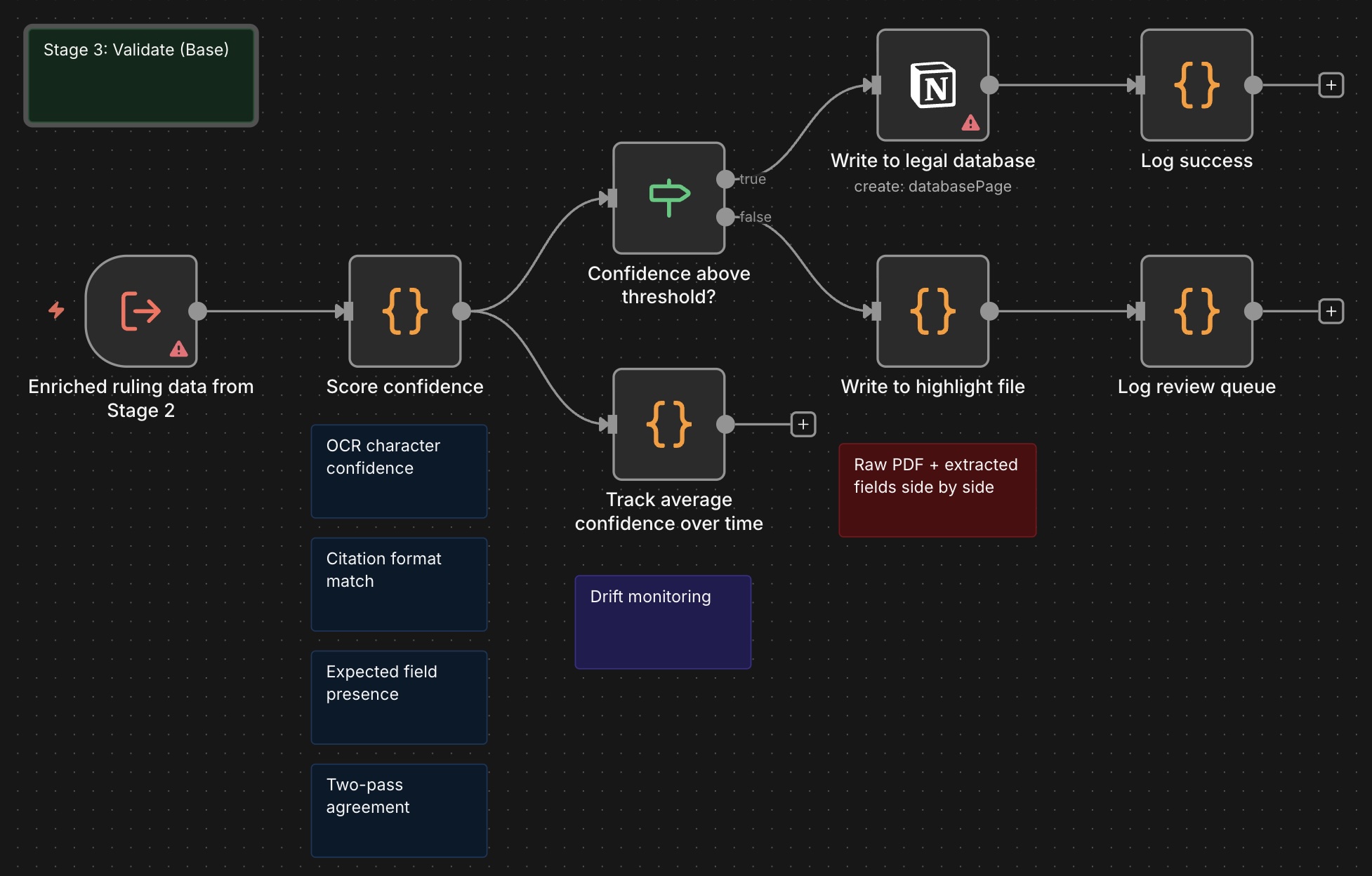
Stage three validates. A confidence score runs over the extracted data. The score is built from a few signals: OCR character confidence, citation format match against the standard register, presence of all expected ruling fields, and agreement between two independent extraction passes. High-confidence entries write directly to the database. Low-confidence entries go to a highlight file for paralegal review, with a link back to the original PDF and the model's extracted fields side by side.
The Impact
At a steady-state success rate of around 95%, the workflow writes most rulings to the database without human review and surfaces a small queue for paralegals to review. For a firm processing about 50 rulings a week, that is 47 or 48 written automatically and 2 or 3 reviewed manually.
Industry benchmarks put manual legal document review at 2 to 4 hours per complex ruling. Even at the low end, that's roughly 90 paralegal hours returned every week. The paralegals aren't replaced. They're pulled off rote reading and can work on other important matters. They're only pointed to the entries that the system flagged as ambiguous, increasing efficiencies.
And when something goes wrong, the stage logs tell the firm exactly where the issue was, which means the fix is truly a fix, not a rewrite.
The Takeaway
Understanding system architecture still matters, even in these days of Vibe coding. A good prompt can get you started. A good structure keeps you running.
The real transfer is the architecture of how you sequence stages, and the engineering discipline to make each stage observable and recoverable when it fails. When you break a complex process into smaller, independently testable steps, the whole thing gets more reliable over time, not less. Each piece can be improved without rebuilding everything around it.
If you have a workflow that runs but nobody trusts, or one that breaks silently and you only find out months later, the fix usually isn't a better prompt. It's a better structure.